



Unlock Your Performance Potential With GTmetrix PRO
More tests, more monitoring, full access to Mobile Testing and expanded global locations, plus the team and workflow tools that come with it.
View Plans and Pricing
Complete Testing Coverage
From One Page to Your Entire Portfolio
All Global Test Locations
Unlock the full list of test locations
See your site the way the whole world sees it, with full access to all 28 GTmetrix test locations on Advanced and Expert plans.

North America

Seattle, WA, USA
San Francisco, CA, USA
San Antonio, TX, USA
Cheyenne, WY, USA
Chicago, IL, USA
Danville, VA, USA

Quebec City, QC, Canada

Mexico City, Mexico
Europe

London, UK

Paris, France

Frankfurt, Germany

Warsaw, Poland

Amsterdam, Netherlands

Stockholm, Sweden

Madrid, Spain
Asia Pacific

Sydney, Australia

Chennai, India

Kuala Lumpur, Malaysia

Busan, South Korea

Auckland, New Zealand
Pune, India

Singapore

Tokyo, Japan

Hong Kong, China
South America

São Paulo, Brazil

Santiago, Chile
Africa

Johannesburg, South Africa
Middle East

Dubai, UAE
Bulk Testing for Large Portfolios
Test your whole portfolio in a few clicks, not one page at a time
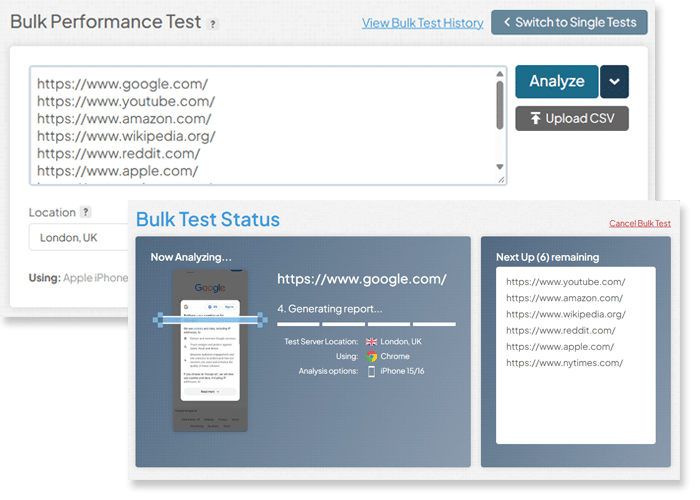
GTmetrix lets you bulk test many URLs at once instead of testing each one individually.
- Run tests on a whole batch of pages under the same location, device, and options in a few clicks
- Upload a CSV or paste a list of URLs to test in bulk
- Bulk operations to enable monitoring/alerts, modify tags, export history, and more
Full Access to Mobile/Tablet Device Testing
Unlock the full device library
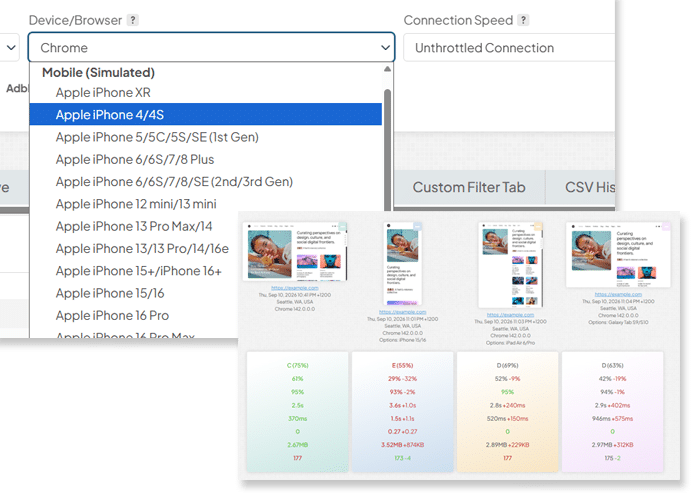
Every GTmetrix PRO plan includes the complete library of 55+ simulated devices, so you can test your site the way your customers actually see it.
- From budget Android phones to the latest iPhone, test what your customers actually use
- Test for device-specific performance, and see exactly how your page loads for it
Unlimited Tags & Filters
Keep a growing portfolio organized
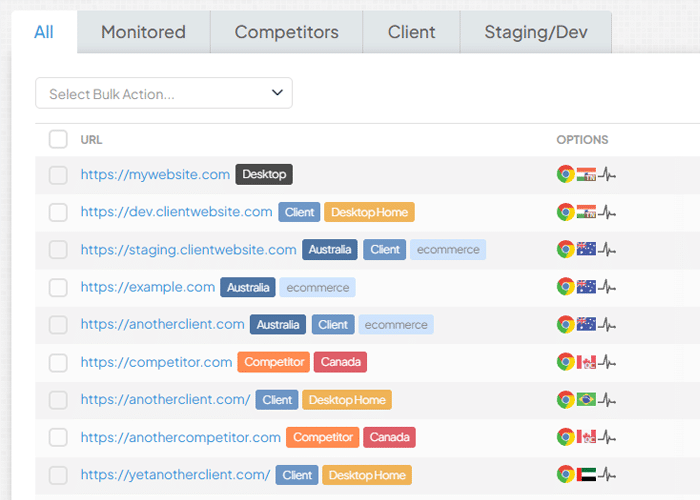
GTmetrix lets you tag and filter every report on your dashboard, so a large portfolio stays easy to navigate instead of turning into an unsorted list.
- Unlimited tags on PRO plans
- Filter pages by keyword, by Analysis Options, or save a custom filter view to reuse on your Dashboard
More Monitoring, More History,
More API/MCP Capacity
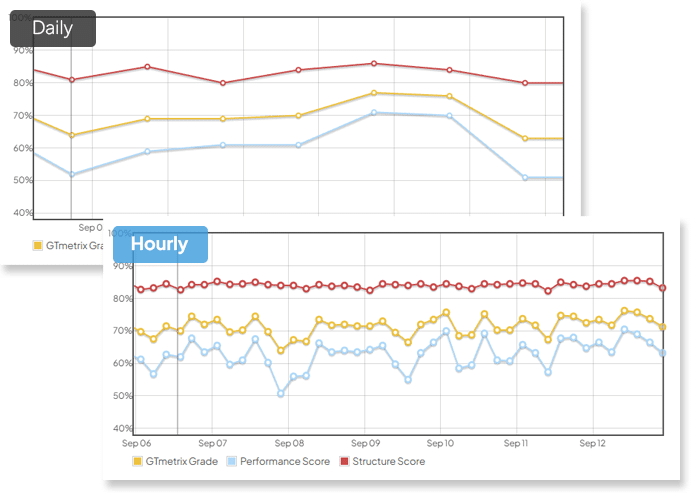
Hourly Monitoring for In-Depth Performance Tracking
Catch a regression within the hour
Hourly monitoring frequency is available on Advanced and Expert plans, for the pages that need the closest watch.
Set up Alerts and get notified the moment performance dips.
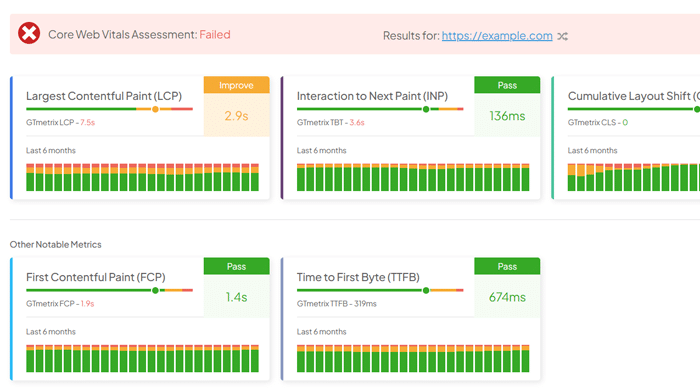
Extended Real-User CrUX History
See how real-user experience has trended over time
Get extended CrUX field-data history, so you can track real-user trends over a longer window
Up to 6 months of real-user CrUX history.
More API/MCP Credits for Integrated Performance Workflows
Built for real production integration and AI workflows
PRO plans include more Daily API Credits, giving your API integrations and GTmetrix MCP usage the throughput to run at production scale.
- Power production-grade API integrations with a larger daily credit pool
- Run more GTmetrix MCP workflows through your AI assistant, day after day
- Custom API-focused plans available on request
Diagram showing GTmetrix MCP connecting to Claude, Codex, Cursor, and Lovable one at a time in turn, with a request pulse traveling to GTmetrix MCP and a result pulse traveling back to the tool, forming a feedback loop.
Built for Performance-Minded Teams
Available Expert Plans Only
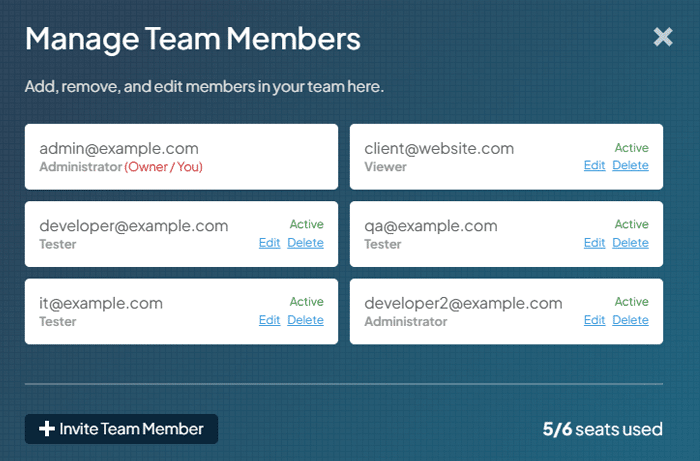
Add Team Members With Roles
Give every member the access they need
GTmetrix lets you invite team members under one Expert-plan account, each assigned one of four roles.
- Owner, Administrator, Tester, or Viewer roles available
- Each role has its own permissions, from running tests to managing members, API keys, and billing
- Invite by email; every member gets their own login
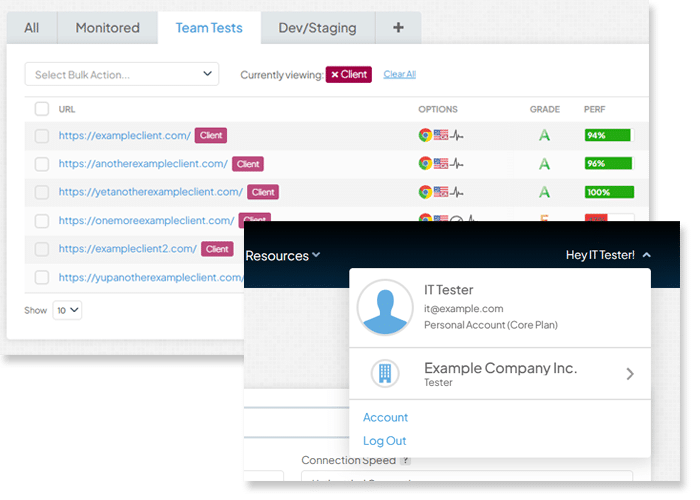
Shared Dashboard Access
Everyone works from the same reports
Every team member sees the same Team Dashboard, with all reports, monitored pages, and history visible to the whole team.
- No separate silos: the whole team works from the same data
- Switch between your Personal and Team accounts anytime
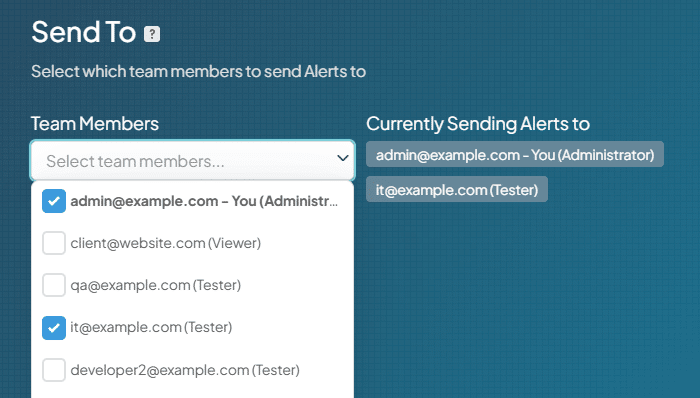
Individual Alerting to Specific Members
Route alerts to the people who need them
GTmetrix lets you configure Alerts on a monitored page to go to specific team members.
- Choose exactly which team members receive Alerts for each monitored page
- More On-Demand Tests, Monitored Slots, and API/MCP credits
- Higher queue priority for faster test turnaround
- More history visualization and higher queue concurrency
- Full PDF Report downloads
- GTmetrix product and API support
Frequently Asked Questions
PRO brings together everything you need to take performance testing from one-off checks to ongoing practice: deeper mobile testing, global test locations, more frequent monitoring, longer historical data, and expanded API/MCP access for automation.
On top of that, select PRO plans include Team Logins, so you can share one PRO account across your team – assigning roles, sending alerts to multiple members, and giving everyone access to the same dashboard instead of juggling separate logins.
Bulk Testing lets you test multiple URLs at once instead of testing pages one by one. It’s built for teams managing larger sites, multi-page audits, or agencies handling several client sites, saving significant time over manual, page-by-page testing.
You can also enable monitoring/alerts, and export report data in bulk to save time and effort.
It includes testing across 55+ simulated devices – various iPhones, Galaxies, Pixels, and tablets.
Pair it with connection throttling (4G, LTE, or custom speeds) to validate performance on the exact devices and network conditions your mobile visitors experience, instead of a generic mobile emulation.
Hourly monitoring checks your site far more frequently (every hour), so performance drops or regressions are caught within the hour rather than once a day.
It’s highly recommended for mission critical, high-traffic, or high-value conversion pages. Combined with an expanded history visualization, this gives you a much finer-grained view of trends over time, which is useful for catching short-lived issues that infrequent checks would miss entirely.
CrUX data reflects real user experiences over time, not a single test snapshot.
Six months of history lets you track long-term trends, confirm whether a fix actually held up, and spot seasonal patterns in how real visitors experience your site.
API/MCP Credits are consumed for starting tests via the GTmetrix API or MCP, longer data retention, and a few other operations like PDF reports and video generation.
With the API or MCP (which connects GTmetrix directly to AI tools and assistants), you can start tests and retrieve performance data programmatically.
Select PRO plans include a higher daily allowance and higher queue priority, making them a better fit for automated workflows, CI/CD integration, or frequent programmatic testing.