GTmetrix is operated by WP Media SAS, a French company registered for VAT in various countries to comply with local tax regulations.
Note: This information is subject to change as tax regulations evolve. We recommend checking this page regularly for updates or reaching out to our support team if you have any questions.
Our VAT Details
- France
- VAT: FR43800260648
- Canada
- GST/HST: 77733 7361 RT0001
- BC PST: 77733 7361 BT0001
- SK PST:
- Account Number: 8158362
- Business Number: 777337361
Who is Charged VAT?
VAT will be charged to users in the following circumstances:
- Users in qualifying countries (EU/UK) that do not provide a valid VAT number
- Non-EU users in countries where local VAT/GST/PST regulations apply
If you have a valid VAT number, please make sure to update your billing details in your GTmetrix account to avoid unnecessary charges.Note: VAT exemption is only applicable to certain countries.
Below is a list of countries that will have VAT included in subscription pricing.
EU Region
Country Country Code Standard Rate Austria AT 20% Belgium BE 21% Bulgaria BG 20% Croatia HR 25% Cyprus CY 19% Czech Republic CZ 21% Denmark DK 25% Estonia EE 24% Finland FI 25.50% France FR 20% – Martinique MQ 8.5% – Réunion RE 8.5% – Guadeloupe GP 8.5% Germany DE 19% Greece GR 24% Hungary HU 27% Ireland IE 23% Italy IT 22% Latvia LV 21% Lithuania LT 21% Luxembourg LU 17% Malta MT 18% Netherlands NL 21% Northern Ireland XI 20% Poland PL 23% Portugal PT 23% Romania RO 21% Slovakia SK 23% Slovenia SI 22% Spain ES 21% Sweden SE 25% Non-EU Region
Country Country Code Standard Rate Canada CA AB – 5% GST
BC – 5% GST / 7% PST
MB – 5% GST / 7% PST
NB – 15% HST
NL – 15% HST
NS – 14% HST
ON – 13% HST
PE – 15% HST
QC – 5% GST / 9.975% QST
SK – 5% GST / 6% PST
NT – 5% GST
NU – 5% GST
YT – 5% GSTEgypt EG 14% Norway NO 25% Switzerland CH 8.10% United Kingdom (Great Britain) GB 20%
How to Update Your VAT Number
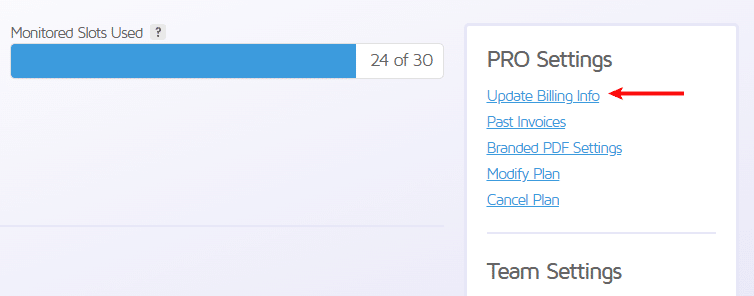
As a PRO subscriber, you can update your VAT number in your Billing Info by visiting your Account page, and clicking Update Billing Info.
 VAT Number can be accessed on your Account page -> Update Billing Info.
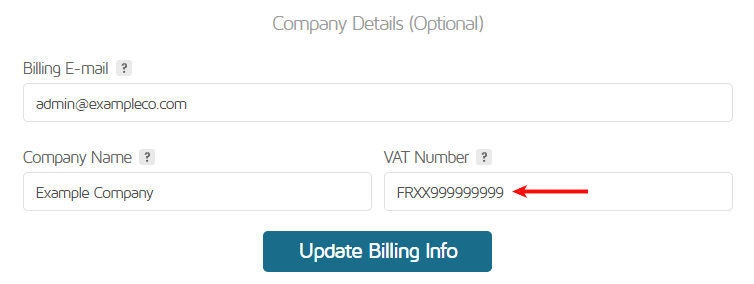
Scroll down to the “Company Details (Optional)” section and input your VAT number in the provided field. Click on Update Billing Info.
 Input your VAT number in the provided field.
Our payment system will validate your VAT number and if successful, VAT will be excluded from your invoice. Note that VAT exemption is only applicable to certain countries.
Contact
If you have any questions regarding VAT/Taxes, please contact us and our billing team will be happy to assist you.