
Audit, optimize, and fix your code in Lovable using real-time GTmetrix insights inside your chat.

Overview
Lovable has quickly become one of the most popular AI-powered development platforms for building websites and web applications.
It excels at rapid application development, bringing your exact product vision to life at high speed.
However, there’s a tradeoff – like many AI code generation tools, Lovable is primarily optimized for delivering functionality, features, and visual design. Performance optimization is often a secondary concern.
Lovable is optimized to deliver the features you requested, not necessarily the most performance-efficient implementation.
As projects grow and additional features are layered onto your application, performance can gradually decline.
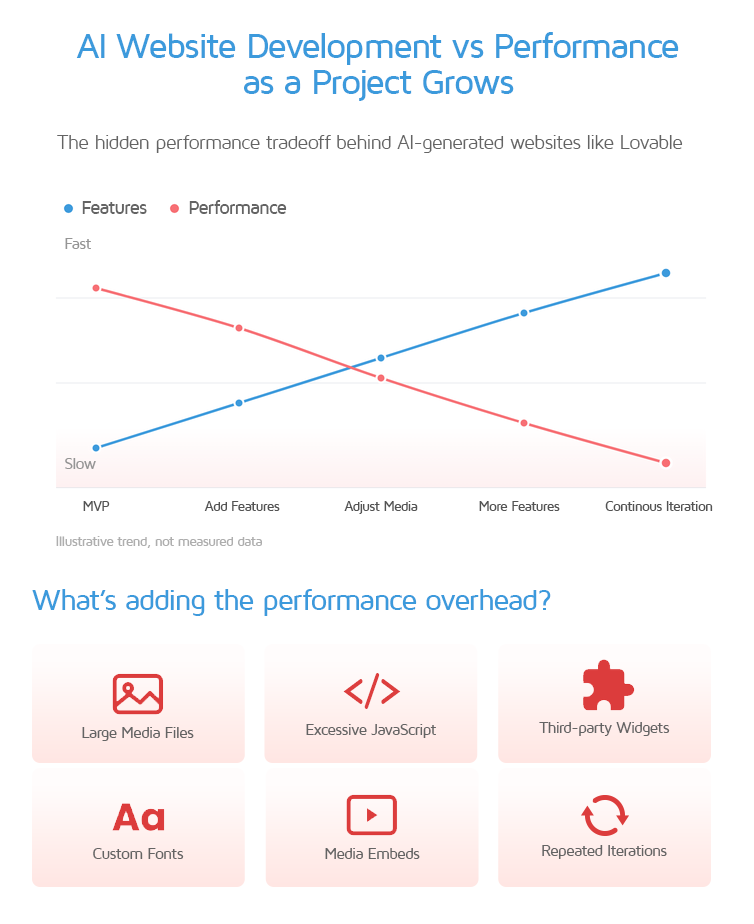
Large media files, excessive JavaScript, third-party widgets, custom fonts, embeds, and repeated design iterations can all introduce significant loading overhead.
Fortunately, there’s a solution: Connect Lovable to the GTmetrix MCP
Bring real-world testing and performance data straight into your Lovable AI workflow with the GTmetrix MCP server.
This allows Lovable to analyze live GTmetrix test data, identify bottlenecks, recommend improvements, and even refactor its own generated code based on actual performance results.
The result is a workflow where Lovable isn’t just building your website; it’s helping to optimize it too.
Why Connect GTmetrix to Lovable?
Most AI-generated websites are evaluated based on whether they function correctly and match the requested design.
Performance is rarely a priority, until after deployment. This creates a common development pattern:
- Build a website
- Add features
- Deploy
- Discover performance issues
- Begin optimization work
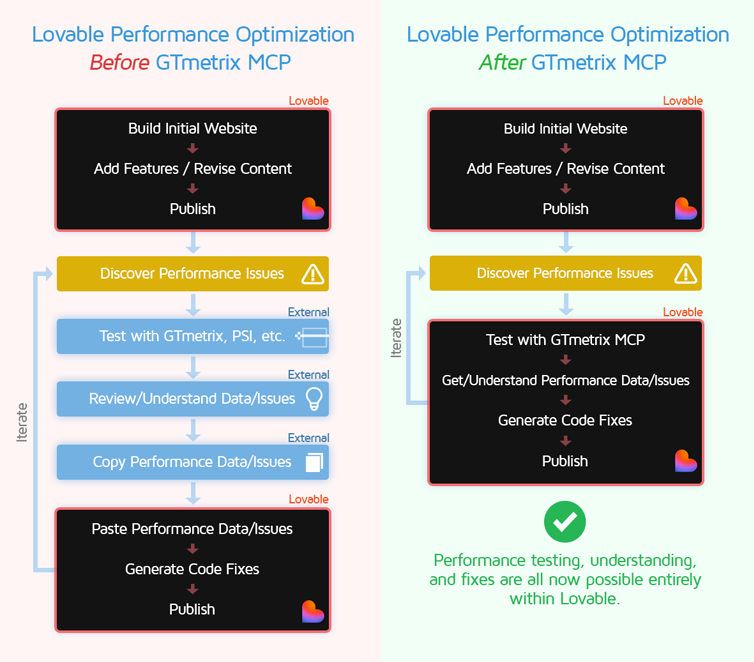
With GTmetrix connected directly to Lovable, performance testing becomes part of the development process rather than an afterthought.
Instead of manually reviewing reports and translating recommendations into implementation tasks, Lovable can consume GTmetrix audit data directly and help resolve issues conversationally.
For example, after running a test, you could simply instruct Lovable:
"Analyze the GTmetrix report and optimize the site for a better
Largest Contentful Paint and lower total page weight"
Lovable can then inspect the performance findings and modify the codebase accordingly.
Real-World Optimization Example: A Travel Website
Let’s take you through a real-world example of how we optimized a Lovable website with the GTmetrix MCP integration.
How to Connect GTmetrix MCP to Lovable
We’ve written a separate guide with step-by-step instructions on how to connect the GTmetrix MCP to Lovable. Check out our setup guide here.
The Starting Point
We created a simple one-page travel website using realistic processes and workflows any Lovable user might do.
- Full-viewport Slider hero (1 video + 4 photos)
- High-resolution vacation media (Slider video, photo gallery, various featured images)
- YouTube video embed
- Weather forecast widget
- Google Map embed
- Google Fonts usage
- Instagram feed
- Cookie consent banner
- Newsletter Pop up

The result is a very real-world example of a typical travel website that showcases photos and videos from a recent trip to Iceland.
Your Lovable Project Needs to be Publicly Available
GTmetrix requires a publicly accessible website to run its tests, so you’ll need to ensure your Lovable project is published and accessible to the public.
Initial GTmetrix Results
Once published, we prompted Lovable to do a GTmetrix test to establish baseline performance.

Frankly – Not bad! Lovable does a good job of producing a decently well performing website from the start.
But there’s room for improvement. The iterative process of adding features, tweaking layouts, modifying functions can add to your codebase and website footprint.
First Round of Optimizations
Now that we had a baseline, we asked Lovable how we can improve our travel site’s performance and it listed the Top 5 issues with the biggest impact:

You can then get Lovable to work on the fixes you want from the chat itself. It is recommended to retest your page after every major optimization to see what effect it had on your page performance.
We started by asking Lovable to optimize the hero video.

As you can see, Lovable was able to reduce the file size of the hero video by 80% from 26MB down to 5MB.
But, upon retesting the site, the total page weight nearly doubled to 10 MB because Lovable identified some requests that were previously cached and didn’t count towards the payload.
We then retested the page to ensure the cache was warmed up and we could have a more representative comparison.
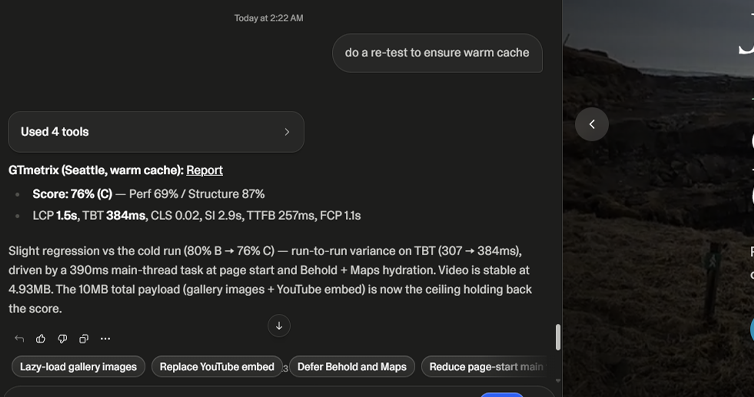
The new test results were now slightly worse than the previous run, driven by JavaScript induced variance (which is quite common in the real world).
The primary drivers were the Behold Instragram widget, YouTube embed, and Google Maps widget.
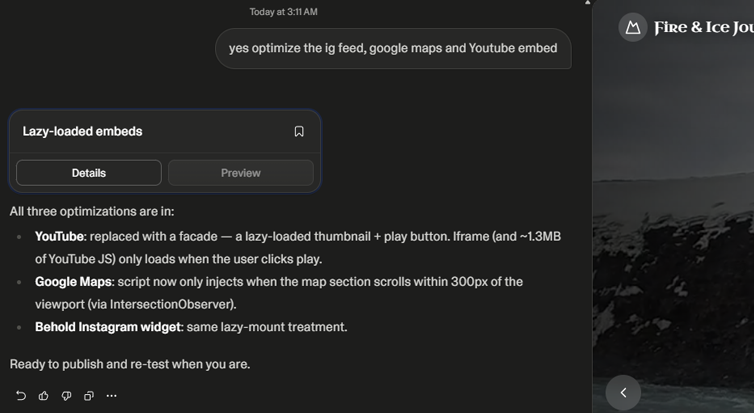
We then instructed Lovable to optimize all 3, resulting in an A Grade with 93% Performance Score. The TBT in particular was reduced from 278ms to just 7ms – a 97% improvement!

Fine Tuning the Experience
Given that the site gets an A at this point, we could have stopped but Lovable said there was still some progress to be made, particularly with the hero video.
We asked Lovable to explain how we can optimize the hero video, and it promptly outlined several possibilities, ordered by impact vs effort.

Since we wanted to keep the video playing, we just asked Lovable to compress the video even further, resulting in a significant reduction in video file size, from 4.9MB down to 2MB.
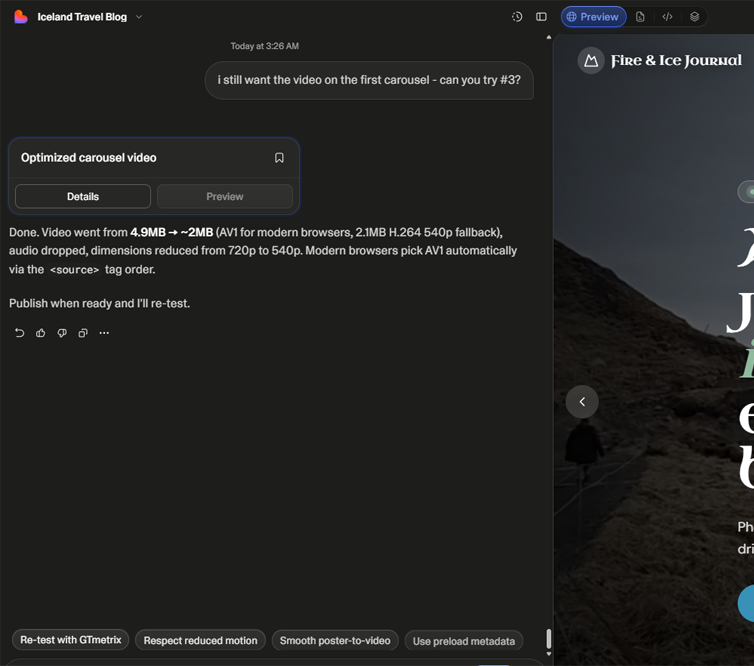
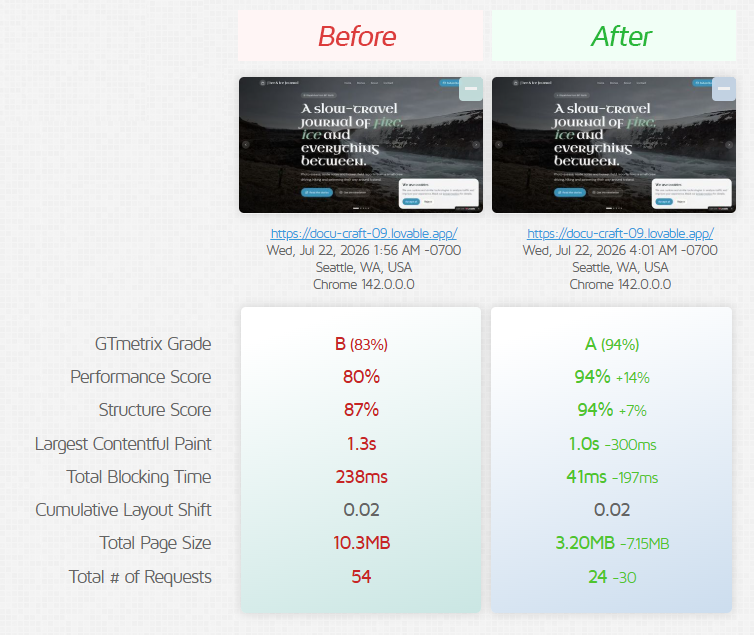
Retesting the page revealed only a modest increase in GTmetrix Score – however, the Total Page Size was now just half of what it was previously, reducing from 6.21MB down to 3.2MB.
This is still a good outcome as it would reduce data consumption for real visitors, particularly on mobile.
We continued to explore whether any additional optimizations were worth pursuing, and Lovable identified 8 opportunities. Most were structural refinements rather than major performance gains, but they were still worthwhile improvements that could benefit visitors.

After reviewing the full list, we selected the optimizations that offered the best balance of impact and implementation effort, and instructed Lovable to apply those changes.

Final Results
Finally, testing the site confirmed nothing else was broken or degraded, and the site continued to score an A.

Testing Methodology and Caveats
When using Lovable and the GTmetrix MCP together, there are some caveats you should be aware of.
Cold vs Warm Caches
When you publish a website on Lovable, you’re effectively pushing brand new code/resources to Lovable’s servers, all of which have not been cached on their edge nodes.
This results in the initial website load yielding “Missed Caches” aka a Cold Cache.
The result is the first visit to your website being slower than subsequent visits, as caches need to be primed with your static resources.
If you initiate a test after publishing and find that the performance is slower than prior tests, do another test now that the cache has been primed (warmed up) to get more accurate results.
In general, it’s good practice to execute a secondary or tertiary consecutive test to warm the edge network and capture your true baseline.
Read more on CDNs and how they work here.
Testing Preview Links
If you want to test your Lovable site before actually publishing, you can do so by using the Preview Link found in the Share dropdown.

However, the performance grades will be artificially lower due to Lovable redirects for previewed pages.
GTmetrix flags this behavior under the “Reduce redirect chains” audit rule. This penalty is purely an artifact of the preview router and disappears on your live domain.
Handling Logged-In Application States
GTmetrix audits public-facing URLs by default and cannot bypass authentication walls to test dashboards or private user views. To overcome this, you can do the following:
- The Ungated Approach (Not Recommended): You can instruct Lovable to temporarily remove authentication logic from an internal page, run the optimization scan, and then re-apply the security gate. This approach is highly manual, creates security risks, and breaks dynamic data fetching that depends on user context.
- The Better Approach: Instruct Lovable to build a dedicated, public-facing staging mirror or mock dashboard page filled with static sample data. Test and optimize this unauthenticated replica using the MCP server to ensure your internal UI components and application dashboards load efficiently without compromising user security.
Summary
Lovable is incredibly good at building websites quickly, but it doesn’t always consider the performance impact of every feature, widget, media file, or design decision along the way.
By connecting the GTmetrix MCP, you can bring real-world performance testing directly into your development workflow. Instead of manually interpreting reports and figuring out what to do next, Lovable can help analyze the results, implement optimizations, and retest the site, all within the same chat.
As our travel website example demonstrated, a few rounds of testing and targeted optimizations can make a meaningful difference. The result is a workflow where performance isn’t an afterthought, but something you continuously improve as you build.
Unlock More API Credits for Lovable Powered Performance Testing
Run more tests with additional API credits. Use GTmetrix MCP inside Lovable to automate testing, compare results, access history, and apply fixes.
Available with select PRO plans (excluding Lite plan).
Other features include: Priority access for tests, More Monitored Slots, Access to more locations, Remote Location Monitoring, Complete Mobile testing suite, and more!