Last Updated:
Learn what the GTmetrix MCP does and how to utilize it in your AI workflow.
Overview
GTmetrix now has an MCP server that lets you connect your preferred AI tools directly to GTmetrix, enabling AI-assisted performance testing and analysis.
Website performance optimization is not a one-off where you run a test, fix issues manually, and forget about it. More and more teams and organizations are working to build intelligent workflows that can analyze, act, and improve continuously.
That’s where the GTmetrix MCP comes in.
In this post, we’ll break down what MCP is, what it does, and how you can connect it to your favorite AI tools to create powerful, automated performance workflows.
We’ve done our best to tailor the content in this post to new users who are exploring MCP for the first time and want a simple introduction before getting started.
Familiar with MCP? Connect to GTmetrix Now!
If you’re an advanced user who already understands MCP concepts and want to quickly connect GTmetrix and start using practical workflows, refer to our setup guide.
What is MCP?
MCP (Model Context Protocol) is an open protocol that lets AI models interact with external tools and data sources in a standardized way.
Instead of being limited to static prompts or one-off analyses, MCP gives AI the ability to:
- Call tools & resources
- Retrieve real-time data
- Execute multi-step workflows
- Take action based on results
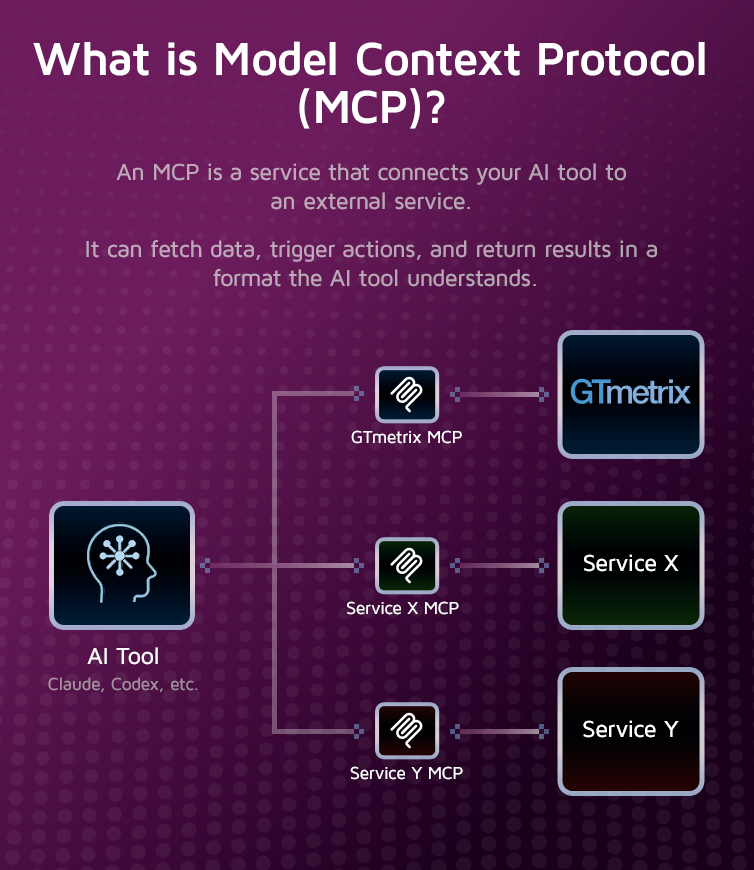
In simple terms, MCP turns an AI model from a “chat interface” into a capable assistant that can execute real-world tasks.
For example:
“Run GTmetrix iPhone/LTE tests on my landing pages in London and Sydney and let me know if performance is comparable.”
What Does GTmetrix MCP Do?
GTmetrix MCP connects your AI model directly to the GTmetrix performance testing platform through the API.
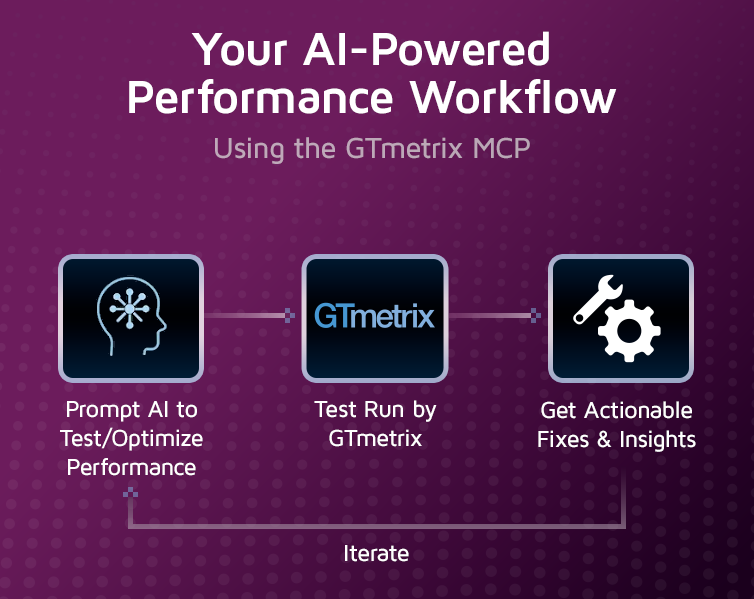
This integration gives your AI the ability to:
- Start and configure GTmetrix tests
- Retrieve performance reports
- Analyze metrics like TTFB, Web Vitals, etc.
- Launch comparisons across different locations, devices, connection speeds, URLs
- Compare historical performance data
- Recommend optimizations
Instead of manually running tests, you can chain all of these actions together into one intelligent workflow.
Starting tests and other actions using the MCP tools consume API credits at the same rate as the GTmetrix API.
GTmetrix MCP Is Not a Chatbot
It’s important to clarify: The GTmetrix MCP is not a chatbot.
We’re not building another AI interface you have to learn or switch to. Instead, MCP gives you the infrastructure to connect GTmetrix to your preferred AI model.
This could be any compatible LLM, such as:
- Claude
- OpenAI ChatGPT Classic/ChatGPT (Formerly Codex)
- Cursor
- GitHub Copilot CLI
- Any other MCP-compatible LLM
This “bring your own AI” approach gives you flexibility; it means you can integrate GTmetrix into your existing workflows without changing your preferred AI environment.
What You Can Do With GTmetrix MCP
With GTmetrix MCP connected to your AI model, you can create powerful workflows that go far beyond basic testing. Here are some practical applications:
Screen captures sped up for brevity.
1) Automated Performance Testing
You can instruct your AI to run tests on-demand, or on a schedule.
For example:
- Run daily tests on key landing pages
- Test new deployments automatically
- Compare performance across regions
Prompt Example:
“Run tests on example.com from Seattle, London, and Sydney using an iPhone 16 on LTE”
2) Intelligent Performance Analysis
Ask your AI model to interpret your GTmetrix results instead of digging through reports.
For example:
- What is slowing down your Largest Contentful Paint (LCP)
- Which resources on your page are render-blocking
- Where are the performance bottlenecks and how to eliminate them
Prompt Example:
“Analyze my latest report for example.com and explain the top 3 performance issues in simple terms.”
3) Historical Comparisons/Trend Analysis
Track performance improvements or regressions over time. This is especially useful for agencies/marketing teams who want to track performance declines or major regressions across a large portfolio of client websites.
For example:
- Compare before vs after website updates
- Health checks across multiple websites
- Detect sudden drops in speed
With the MCP, you can not only retrieve results from pages being monitored through the front-end UI, but also create your own monitoring workflow through the API and keep track of it through the MCP-AI connection.
Prompt Example:
“Give me a performance health check across all my monitored "client" pages. Flag any sites with a GTmetrix grade below B or an LCP over 2 seconds.”
4) Actionable Optimization Recommendations
AI can go beyond just reporting and provide clear next steps on what you need to do to improve your web performance.
For example:
- Image compression strategies
- Lazy loading scripts
- Identifying unused CSS/JavaScript code
Prompt Example:
“How do I fix inefficient cache policy?”
5) CI/CD and DevOps Integration
GTmetrix MCP can be integrated into development/deployment pipelines (or your CMS) to create end-to-end automation loops.
For example, your AI can run GTmetrix tests, identify performance issues, apply fixes, then retest to confirm improvements all in a single closed loop workflow.
Prompt Example:
“Fix render-blocking JavaScript on my WordPress site, then rerun GTmetrix and confirm the improvement.”
You can also extend this, for example to:
- Run performance tests after every deployment
- Block releases if performance drops below a threshold
- Generate automated reports for teams
Why Use the GTmetrix MCP
Performance optimization is not a one-off process – it is often reactive, manual, repetitive, and dependent on human interpretation.
Using the GTmetrix MCP changes this by enabling:
- Automation: AI can run tests, analyze results, and repeat processes without manual input.
- Context-Aware Insights: AI can use historical data and past results to make smarter decisions.
- Actionability: Instead of just reporting issues, AI can suggest or even implement solutions.
- Continuous Optimization: Performance becomes an ongoing process rather than a one-time audit.
The GTmetrix MCP is useful regardless of how tech-savvy you are.
For basic users who are not technically versed in web performance concepts, the GTmetrix MCP can help AI explain what is slowing down your page, how to fix it, and even directly fix it for you in some cases. Think of it as having access to your own digital web performance expert.
For advanced users who already use AI in their development environment, the GTmetrix MCP can help you directly integrate GTmetrix testing into your existing workflow in a simple manner.
How to Connect to the GTmetrix MCP
You can easily connect your AI to the GTmetrix MCP using Oauth or editing the JSON/TOML configuration file. Refer to our basic setup guide to learn how you can do this.
If you already have a preferred AI tool and are looking for specific guidance, refer to our tool-specific guides here:
- How to Connect the GTmetrix MCP With Claude
- How to Connect the GTmetrix MCP With ChatGPT Classic
- How to Connect the GTmetrix MCP With ChatGPT (Formerly Codex)
- How to Connect the GTmetrix MCP With Cursor
- How to Connect the GTmetrix MCP With GitHub Copilot CLI
Summary
The GTmetrix MCP is more than just a feature; it’s a foundation for AI-powered performance optimization.
By connecting your AI tool to the GTmetrix MCP, you’re enabling it to:
- Run real GTmetrix tests
- Understand what’s slowing your page
- Take meaningful action to rectify it
- Continuously improve your site
If you’re serious about website speed, user experience, and automation, MCP is the next step forward in this increasingly AI-integrated world.
Frequently Asked Questions (FAQ)
Here are some common questions about the GTmetrix MCP.
What is MCP (Model Context Protocol)?
MCP is an open protocol that allows AI models to interact with external tools and data sources, enabling real-time actions, workflows, and integrations.
What does the GTmetrix MCP do?
It connects your AI tool to GTmetrix, allowing it to run tests, analyze metrics, compare reports, retrieve historical data, and recommend optimizations.
Is GTmetrix MCP a chatbot?
No, MCP is not a chatbot; it’s an integration layer that connects GTmetrix to your preferred AI tools.
Which AI tools can I use with GTmetrix MCP?
You can use tools like ChatGPT Classic, Claude, ChatGPT (Formerly Codex), Cursor, GitHub Copilot CLI, or any other MCP-compatible AI tool.
Is the GTmetrix MCP free to use?
Yes, you can connect the GTmetrix MCP to your AI tool for free.
Running tests through the MCP would consume API credits, and your allotment of API credits would depend on your plan tier:
- Guest users (non-logged in) get 3 Trial API credits
- Basic users get 5 Trial API credits
- Lite plan users get 10 Trial API credits
- All other PRO plan users get an allotment of Daily API Credits according to their plan tier
Actions such as retrieving report data, comparing existing results do not consume any API credits (refer to our API documentation to learn which actions consume API credits).
Do I need a GTmetrix account to use the MCP?
No, it is possible to connect the GTmetrix MCP to your AI tool without creating a GTmetrix account.
However, Guest usage is highly limited and you’ll need to reauthenticate by connecting your AI tool to your GTmetrix account in order to access more API credits and continue testing.
How do I connect to GTmetrix MCP?
You can connect using OAuth (recommended) or manually configure it using JSON/TOML files with an API key.
Does using MCP consume API credits?
Yes, actions such as running tests and retrieving data consume API credits at the same rate as the GTmetrix API.
What workflows can I automate with MCP?
You can automate performance testing, report analysis, historical comparisons, optimization workflows, and CI/CD performance validation.
Can MCP help identify and fix performance issues?
Yes, it enables AI to detect bottlenecks, explain root causes, suggest fixes, and in some cases apply optimizations automatically.
Why isn’t my GTmetrix data displaying in nice graphics, graphs, etc?
AI tools all behave differently and have varying capabilities when it comes to rendering responses. You can ask your AI to “visualize this data” after getting a GTmetrix Report and commit it to memory.
Can I analyze historical performance data using MCP?
Yes, MCP allows AI tools to retrieve and analyze historical GTmetrix data to track trends and identify regressions.
Who should use GTmetrix MCP?
Both beginners and advanced users can benefit; non-technical users get AI-driven insights while developers can integrate MCP into automated workflows.
Unlock More API Credits for AI Powered Performance Testing
Run more tests with additional API credits. Use GTmetrix MCP inside your AI environment to automate testing, compare results, access history, and surface actionable insights.
Available with select PRO plans (excluding Lite plan).
Other features include: Priority access for tests, More Monitored Slots, Access to more locations, Remote Location Monitoring, Complete Mobile testing suite, and more!