
“Sometimes a two-second slowdown is all it takes to reduce conversions, disrupt Smart Bidding, and derail a profitable Google Ads campaign.”
Overview
A landing page doesn’t have to fail to hurt performance.
Most advertisers watch their Google Ads accounts closely. Far fewer monitor the landing pages those campaigns depend on.
At Yael Consulting, we’ve managed paid advertising campaigns across hundreds of clients since 2011.
One of the most common, painful, and preventable causes of campaign decline isn’t related to bids, targeting, creative, or budget.
It is landing page performance.
A page doesn’t need to crash or break to become a problem. Any update that slows the page down by a couple of seconds is enough to send a healthy Google Ads campaign into a downward spiral that can take weeks to recover from.
We’ve seen this pattern repeatedly, which is why GTmetrix Monitoring and Alerts have become an essential part of how we protect our clients’ campaigns from such avoidable performance regressions.
A Real-World Example: A Mattress Retailer’s Hidden Performance Problem Costing Conversions
Before explaining how this happens, let’s look at a real example.
The Situation
When we took over Google Ads management for a mattress retailer, the account improved quickly.
We refined campaign structure, optimized bidding strategies, and improved targeting. Traffic increased and engagement metrics looked healthy.
But there was one problem:
Conversion rate remained stubbornly low. Quality clicks were coming in, but the purchases weren’t.
What GTmetrix Found
Instead of making more account-level changes, we ran a GTmetrix test on their product and contact pages.
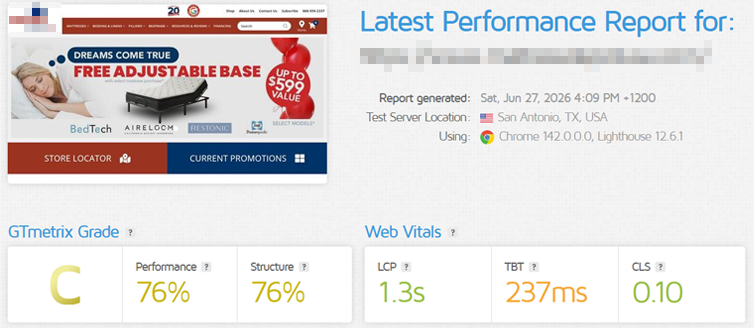
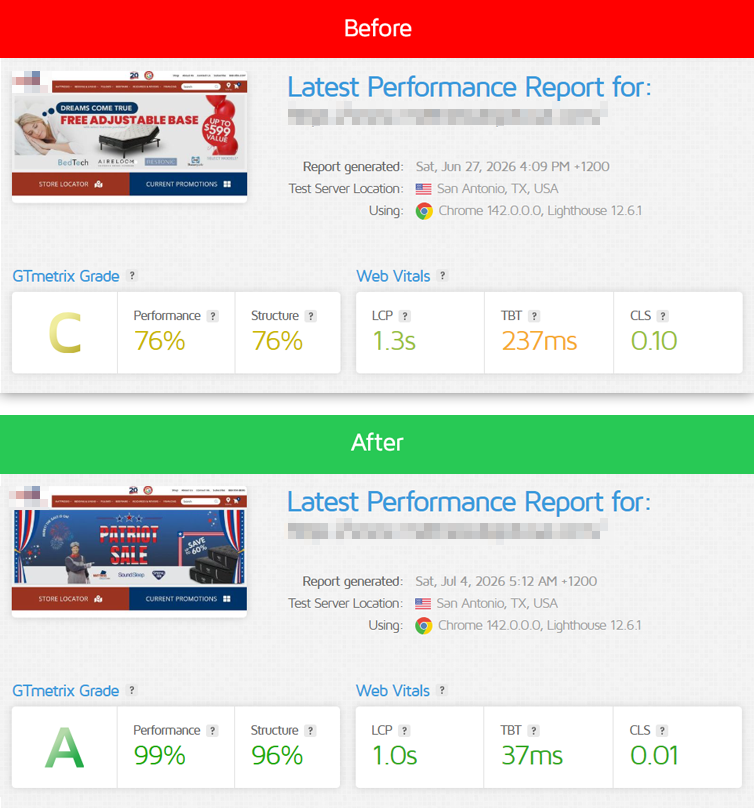
The page earned a 76% Performance Score and a C Grade. The results revealed several performance bottlenecks that were creating unnecessary friction for visitors.
While that might not sound alarming, shoppers comparing multiple products are actively weighing you against competitors. Every additional second creates another opportunity to leave.
“A page doesn’t need to be slow enough to feel broken. It only needs to be slower than the alternatives.”
The Fix
We shared the bottlenecks GTmetrix flagged with our web developer who implemented some targeted improvements, including:
- Optimizing large images
- Removing unnecessary third-party scripts
- Reducing excess scripts and uncompressed files slowing load time
- Improving resource loading efficiency
After the updates, the page jumped to a 99% Performance Score and an A Grade.
The Result
The impact extended beyond page speed. As performance improved, so did campaign efficiency.
With a faster landing experience:
- Conversion rates improved
- Visitors stayed on the page longer and bounce rate reduced
- Smart Bidding used more accurate conversion data
- Campaign performance improved
No amount of Google Ads optimization can fully compensate for a page that loses people before they ever have a chance to convert.
Understanding the Performance Death Spiral
We’ve seen this same pattern play out with other clients too. In fact, we regularly see a similar pattern unfold across paid search campaigns.
1) The Landing Page Gets Slower
A seemingly minor change occurs:
- A new plugin is installed
- New product photos or promotional banners get added without being compressed
- A tracking script is added
- A third-party tool begins loading slowly
Nothing appears broken. The site still loads. Nobody notices.
But here’s what happens next.
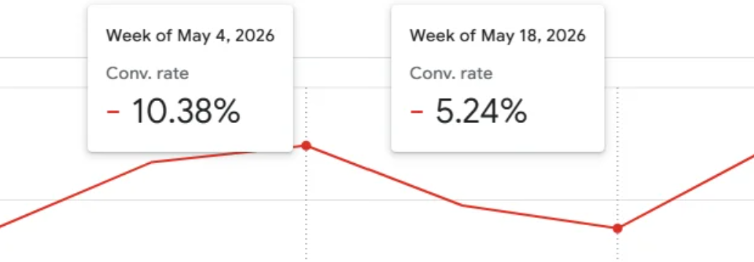
2) Conversion Rates Begin Falling
Users are less patient than ever. A delay of even a second can have a measurable impact on conversion rates.
Visitors abandon forms, product pages, and checkout processes before converting.
The decline is often gradual, making it difficult to immediately connect the issue to performance.
3) Google’s Smart Bidding Algorithm Responds
Modern Google Ads campaigns increasingly rely on AI-powered systems such as:
These systems continuously learn from conversion signals.
When landing page performance declines, Google Ads’ automated bidding system doesn’t know that a plugin was added or a script began timing out.
It only sees the results:
- Fewer conversions
- Higher bounce rates
- Lower engagement
- Reduced conversion volume
As those signals worsen, the AI interprets the website as being less relevant to the incoming traffic and begins adjusting bids accordingly, ultimately leading to the campaigns spending less.
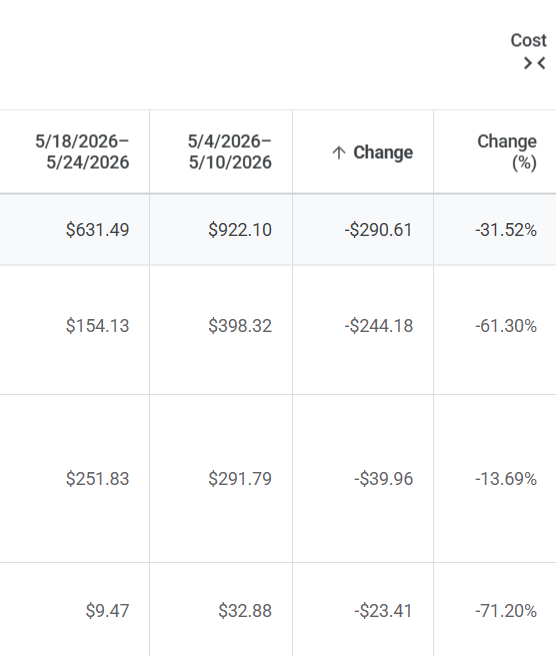
A slow landing page doesn’t just lose visitors; it teaches Google’s AI Smart Bidding Algorithm that your traffic converts less effectively.
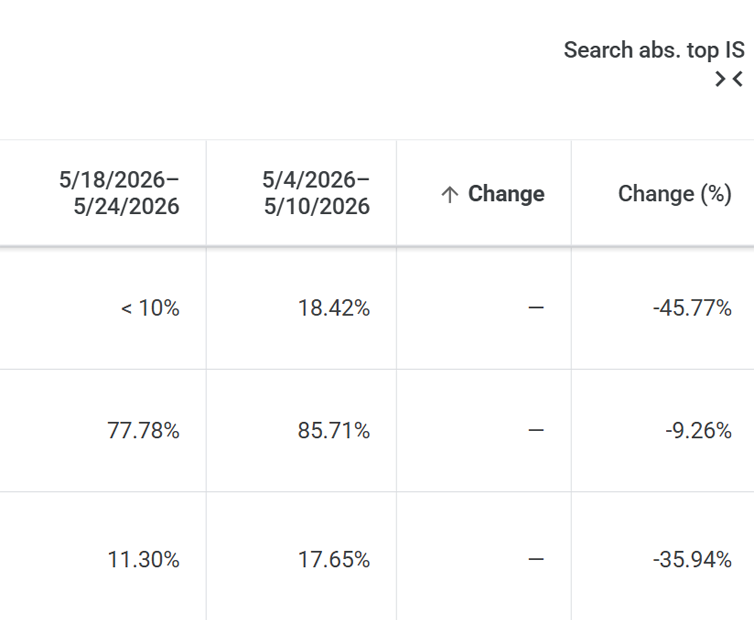
4) Traffic Declines
As Smart Bidding becomes more conservative:
- Fewer auctions are won
- Impression share decreases
- Click volume falls
Traffic begins declining even though the original problem wasn’t related to campaign performance.
5) The Algorithm Has Less Data to Learn From
With fewer clicks and fewer conversions, Google’s AI receives less information.
Optimization becomes more difficult.
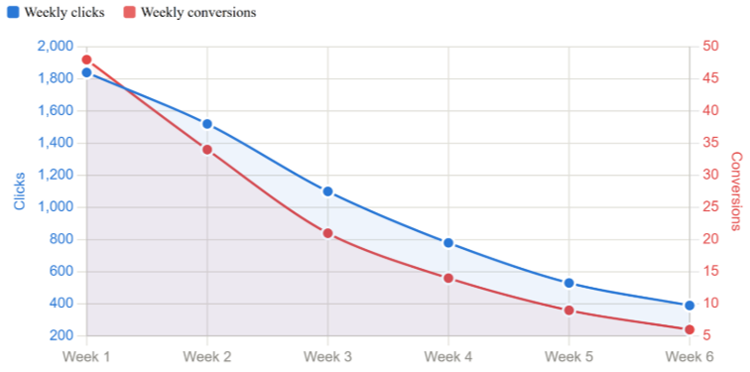
The campaign enters a negative feedback loop, and the spiral compounds:
Slower page → lower conversion rate → reduced bids → less traffic → fewer conversions → less learning data
By the time the drop shows up clearly in Google Ads, the root cause has been sitting on the website for weeks.
Then comes the part that really hurts: you find the page speed issue and fix it, but the campaign doesn’t snap back immediately.
Smart Bidding needs time to rebuild the conversion history it lost. The algorithm needs to relearn, even though the underlying problem has already been resolved.
The total damage window is far longer than the original issue warranted. And in most cases, it was entirely preventable.
Why This Hits Paid Traffic Hardest
Organic traffic has patience. Paid traffic does not.
Someone who clicked your Google Ad was ready to act.
A slow-loading page erases the momentum you paid to create, and that click costs money regardless of whether the page loaded in 1 second or 6 seconds.
Paid traffic is also unique because performance is evaluated by both humans and AI.
Visitors decide whether the experience is worth continuing. At the same time, Google Ads’ bidding algorithms evaluate your conversion signals and use that data to influence future bidding decisions.
Put simply, a slow page creates negative outcomes on both fronts. That is why we repeatedly tell our clients:
“Landing page speed has a huge impact on paid campaigns, and why monitoring your ad landing pages (not just your homepage) is extremely important.”
Why Performance Matters Even More in the Age of AI
AI is helping marketers create campaigns faster than ever.
Teams now use AI to:
- Generate ad copy
- Build landing pages
- Analyze campaigns
- Optimize bids
- Create testing frameworks
But AI cannot compensate for a poor user experience.
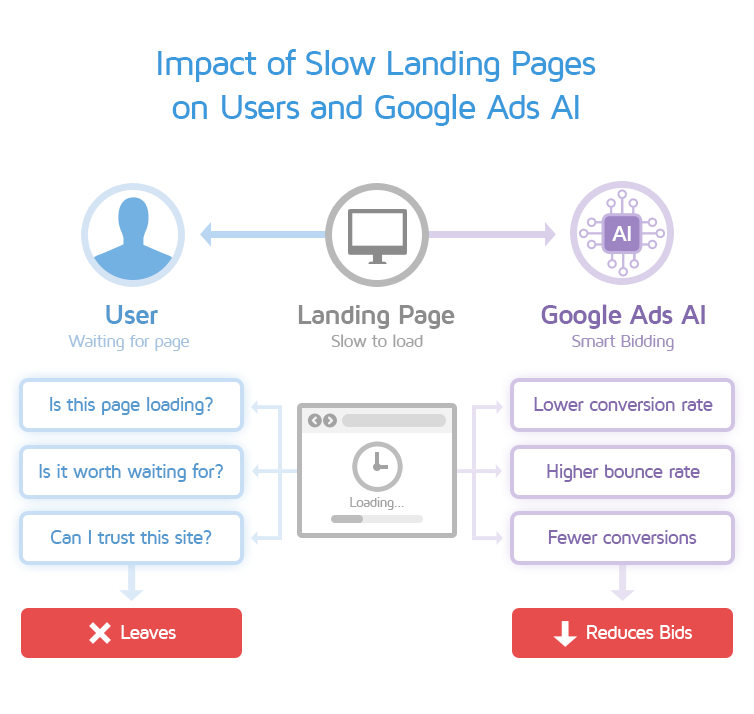
In fact, AI-driven systems amplify the consequences of weak performance because they rely on behavioral signals to make decisions.
If landing page performance declines:
- Users convert less frequently
- AI receives poorer-quality signals
- Optimization systems adapt negatively
- Campaign performance compounds downward
The faster marketing becomes, the more important it is to continuously monitor the experience users ultimately encounter.
How We Use GTmetrix to Stay Ahead of It
Because these problems can be difficult to spot manually, we’ve built a monitoring framework around GTmetrix.
1) Monitor Your Ad Landing Pages, Not Just Your Homepage
Most paid traffic never lands on the homepage.
Instead, visitors arrive on:
- Service pages
- Product pages
- Contact forms
- Campaign-specific landing pages
These are the pages that directly influence ROI.
With GTmetrix PRO’s monitored slots, we automatically monitor:
- Primary ad landing pages: the specific URLs your active campaigns are sending traffic to
- Contact and lead form pages: where the final conversion action happens
- Top navigation and service pages: especially those linked from ad extensions
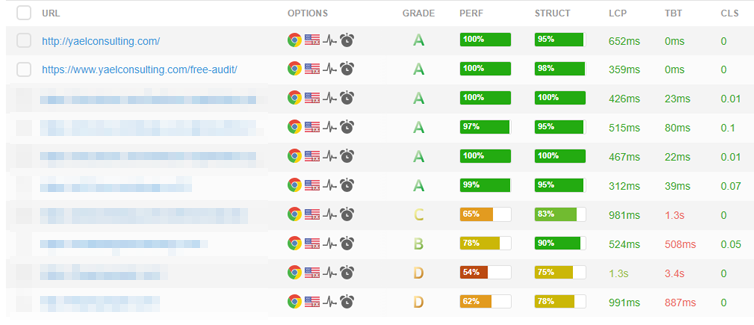
To find your highest-priority URLs, pull the landing page report directly from your Google Ads account and sort by clicks or cost.
Whatever pages are driving the most paid activity should be monitored.
2) Test Both Desktop and Mobile Separately
This step is one that’s easy to skip, but costly if you do so.
Desktop performance does not guarantee mobile performance.
Since the majority of Google Ads traffic is mobile, testing only on desktop gives you an incomplete picture of what your paid visitors may actually be experiencing.
With GTmetrix PRO, you can simulate specific devices and connection speeds as part of your monitoring setup.
For ad landing pages, we typically configure:
- A desktop monitored slot: to catch broad performance issues
- A mobile monitored slot: using a simulated mid-range Android or iPhone device with a realistic mobile connection speed

Each URL + Device combination consumes 1 Monitored Slot, so plan accordingly. For active campaign pages, both slots are worth it.
3) Set Alerts That Notify You Early
Monitoring creates the data, but Alerts are what make it actionable.
Without alerts, performance issues often go unnoticed until campaign metrics deteriorate.
GTmetrix Alerts send an email notification the moment a monitored page crosses your specified threshold, with a direct link to the full report showing exactly what changed.
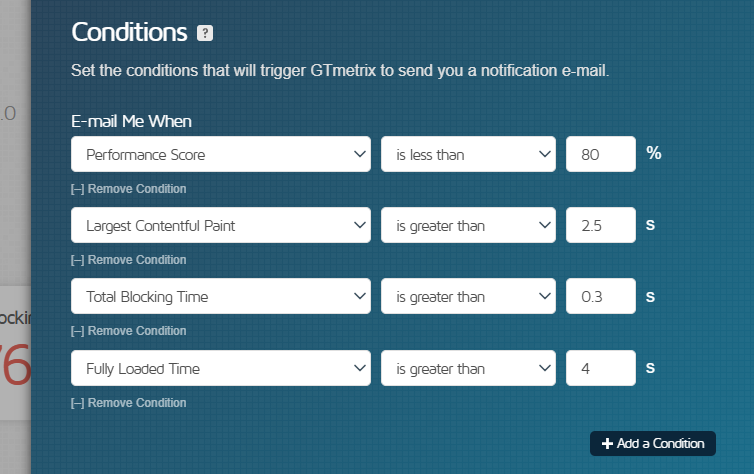
For our ad landing pages, we typically set alerts on the following metrics:
- GTmetrix Performance Score
- Alert if score drops below 80%
- Provides an early warning signal that meaningful changes occurred
- Largest Contentful Paint (LCP)
- Alert if LCP exceeds 2.5s
- LCP is a Core Web Vital that measures perceived loading speed and is used by Google to evaluate landing page experience
- Total Blocking Time (TBT)
- Alert if TBT exceeds 300ms
- Another Core Web Vital that helps identify responsiveness issues and that often impact mobile conversions
- Fully Loaded Time
- Alert triggered if it exceeds 4s
- Useful as an overall catch-all metric
Set your thresholds relative to each page’s normal baseline, not against a universal standard.
If your page typically scores 91, an alert at 80 gives you a meaningful buffer. If it normally sits at 83, adjust the threshold accordingly.
The goal is simple:
Catch issues early. Fix them fast. Protect campaign performance before the damage compounds.
Summary
A slow landing page rarely causes immediate disaster, but for advertisers running Smart Bidding, it’s a campaign threat that builds gradually and takes far longer to undo.
Conversions decline. Smart Bidding reacts. Traffic decreases. Learning slows. Recovery becomes far more difficult than fixing the original issue.
The frustrating part? Most of these problems are entirely preventable.
GTmetrix monitoring helps close the gap between a performance issue appearing and a marketer discovering it.
By continuously monitoring critical landing pages, testing real-world experiences, and alerting teams when performance changes, you can stop small slowdowns from becoming major campaign problems.
In today’s advertising landscape, speed doesn’t just influence users; it also influences the AI systems making decisions about your campaigns.
Keep pages fast. Keep signals clean. Give your visitors and your bidding algorithm every reason to convert.
About the Editor

Lior Krolewicz is the Founder and CEO of Yael Consulting, a boutique paid advertising agency specializing in Google, Microsoft, and Meta Ads. Yael Consulting has been helping businesses maximize their paid advertising results since 2011.
Are you using GTmetrix in your day-to-day? We’d love to hear how we’ve helped you on your journey to a faster website! Contact us if you have a story to share.
Monitor Your Landing Pages to Prevent the Downward Death Spiral
Get more Monitored Slots, Hourly Monitoring, On-Demand Tests, and Access to more Test Locations with a GTmetrix PRO plan.
Other features include: Priority queue access, Mobile Testing, Bulk Testing, Remote Location Monitoring, and more!