Lighthouse: Avoid chaining critical requests
Overview
Critical request chains are render-blocking resource dependencies that slow page loads. Reducing them lowers latency and helps pages render faster.
How does your site score on this audit?
How do critical request chains affect page performance?
A critical request chain is a sequence of requests that depend on each other, and are essential for page rendering. It is determined by the Critical Rendering Path, which establishes the order the requests are parsed and executed in.
When the browser parses the HTML at the start of the page load process, it processes the critical requests based on the assigned priority.
Unless specified, HTML usually has the highest priority, followed by CSS, images, and JavaScript.
When these critical requests form long chains, they increase latency and extend your page load times.
The maximum critical path latency is the aggregate total of the time spent downloading all the resources in the longest critical request chain.
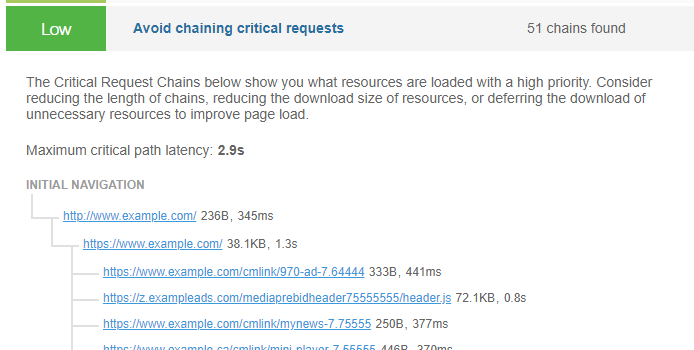
Minimizing the number of critical resources by deferring their download, or eliminating them altogether, or shortening the critical path length can boost your website performance and improve your visitors' user experience.
How does GTmetrix trigger this audit?
According to GTmetrix, a critical request is defined as one that is:
- Render-blocking
- Not preloaded
- Declared with a medium, high, or very high priority
This audit gets triggered if there is at least one such chain of critical requests.
For triggered audits, GTmetrix displays the longest critical request chain in detail, allowing you to view each request. The maximum critical path latency is also displayed.
How to fix this audit?
In general, evaluate what resources are loaded on your page and try to minimize the time and effort spent by the browser on loading your page.
There are a few strategies you can employ to optimize the critical request chain length, such as:
1) Preloading key requests
Preload key requests (e.g., scripts, web fonts, stylesheets, etc.) to speed up critical resource execution, saving valuable time during the page loading process.
2) Reducing the number of critical resources
Reduce the number of critical resources needed (i.e., resources needed to display above-the-fold content) by deferring or asynchronously loading non-critical resources, or where possible, eliminating them altogether.
This ensures that the browser spends less time loading resources that aren't initially needed - e.g., below-the-fold images, JavaScript, CSS styling for non-critical content, etc.
To learn more about optimizing critical request chains, read this article.3) Using the font-display attribute
Where possible, use the font-display attribute to optimize web font loading and your visitors' page experience.
4) For CMS Users (WordPress and other CMS)
WordPress (and other CMS) users can use a caching plugin like WP Rocket to perform some of the optimizations listed above (e.g., preloading requests, deferring scripts, lazy loading below-the-fold images, etc.).
Read our detailed WordPress optimization guide using WP Rocket.
Note: This is an advanced-level optimization
Developer support is strongly recommended.